COK Farm Hosting

COK farm account hosting

Let your farms gather, grow and collect daily rewards automatically. We run the hosted accounts; you use Telegram to check them and manage their settings.

What the hosting service does for you

Gather and develop

  • Resource gatheringGather your chosen resource and switch talents to match that resource.
  • Buildings and researchUpgrade buildings, work through configured research targets and unlock land as the castle grows.
  • Troop trainingTrain the configured troop types and quantities.

Building automation may use inventory speed-ups and gold to rent a second building queue.
Collect rewards and heal

  • Daily collectionsCollect mail rewards, online chests, city rewards, daily quests, prayers and available items.
  • VIP, princess and eventsClaim VIP daily rewards, complete princess sign-in and interactions, and collect supported event rewards.
  • Hospital treatmentTreat wounded troops in batches without spending gold on treatment.

Help your alliance

  • Alliance helpRespond automatically to alliance help requests.
  • Alliance donationsDonate according to activity task progress and available resources.
  • Shield itemsBuy shields from the alliance shop when personal points and stock are sufficient.

Tasks run when the hosted account is online and the relevant features are enabled. Game requirements and available resources still apply.

You stay in control through Telegram

Check accounts and resources, request shields, manage trusted players, or apply settings to several accounts together. The guide explains each step.

Read the user guide
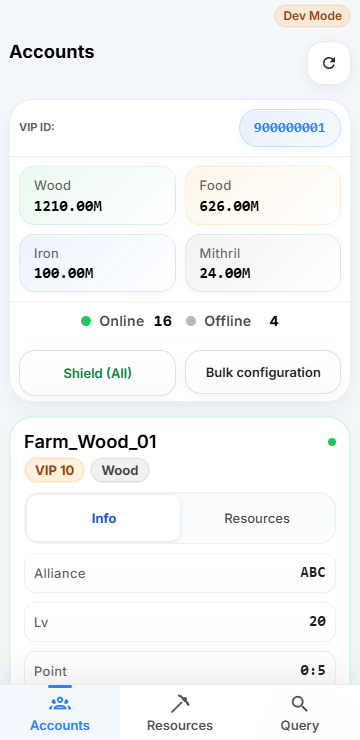
Your accounts, together

Your accounts, together

Check account status and resource totals in one place.

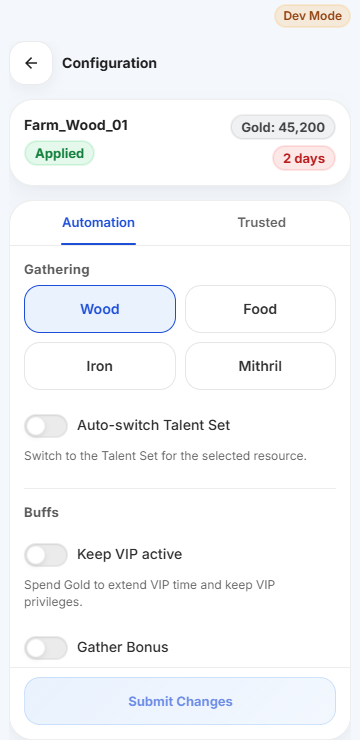
Settings for each farm

Settings for each farm

Choose gathering, buffs and shield rules to suit each account.

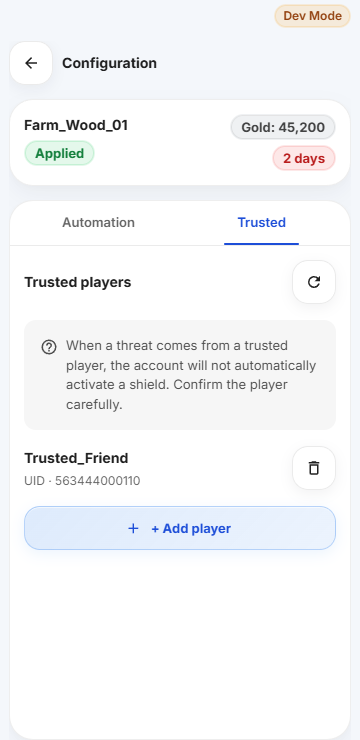
A trusted player list

A trusted player list

Choose whose attacks should not trigger an automatic shield.

Get started in three steps

  1. Contact usDiscuss your accounts, service availability and pricing.
  2. Open the Mini AppSupport will guide you to the app. Share your VIP ID to link your accounts.
  3. Review your settingsOnce linked, check your accounts and choose the automation you need.